AI only copies what is printed on the paper. Our own code then matches every item code with the Delhi Analysis of Rates 2023, so a wrong code shows up on the next page for you to fix.
How to upload
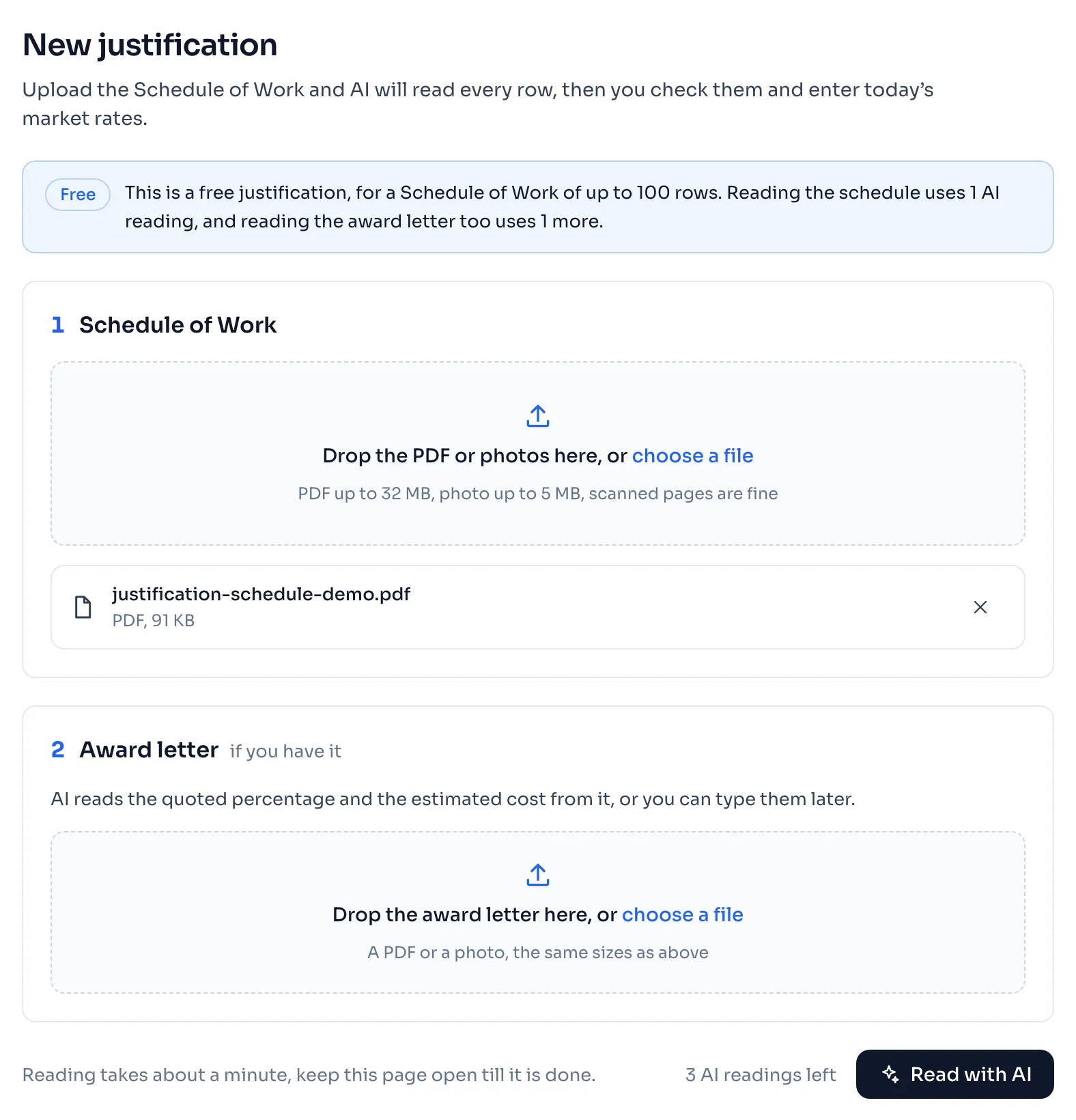
- Press Justification in the side menu, and then New justification. With a free justification, press Check a schedule free instead.
- In step 1, Schedule of Work, drop the PDF or the photos on the box, or press choose a file. A PDF can be up to 32 MB, a photo in JPG, PNG or WEBP up to 5 MB, and a reading takes up to 40 files. Scanned pages are fine.
- In step 2, Award letter, add the letter of the tender if you have it. AI reads the quoted percentage, the estimated cost, the name of work, the tender number and the lines of the office from it.
- Press Read with AI. The rows come up on the screen as AI reads them, and it takes about a minute. Keep the page open, because closing it stops the reading.
- When the reading is done, you come to the page Check the rows. Check the rows
Things to know
- The award letter is optional, and reading it is a second AI reading. With only 1 AI reading left, AI reads the Schedule of Work and you type the figures from the award letter yourself.
- The award letter is read after the schedule. If the schedule cannot be read, the reading of the letter is not used.
- If the award letter cannot be read, the justification is still made and the next page asks you to type its figures.
- Press Stop reading to stop. A reading you stop is still used, see AI readings.
- A justification holds up to 400 rows. A very long schedule can be cut short by the reading, so compare the number of rows AI read with the rows on your paper.
- We delete the file as soon as it is read, even when the reading fails. What AI read is kept, as our Privacy policy says.
- A clear scan reads better than a dark or cut off one. For a long document, send one PDF and not many photos.
If you see this message
cannot be read, please use a PDF or a photo in JPG, PNG or WEBP. under the box, with the name of your file
The file is not a PDF or a photo. Choose another file.
This file is too big to read
Send fewer pages or a smaller scan. This reading is not counted.
The reader is busy right now
Wait a minute and read again. This reading is not counted.
AI could not read the award letter, so please type the quoted percentage and the other figures below. on the page Check the rows
The schedule was read, and only the letter was not. Type the figures from your award letter.
Reading the schedule uses 1 AI reading, and reading the award letter too uses 1 more. in the blue line under the badge Free
This is a free justification. Add the award letter only if you want AI to read it, and type its figures yourself if you do not.
You have only 1 AI reading left, so AI will read the Schedule of Work and you can type the figures from the award letter yourself. under the box for the award letter
AI reads the schedule and not the letter. Type the figures from your award letter on the page Check the rows.
Justification comes with a pass
You have no pass, and you have made all your free justifications. Pass prices