How to download it
- Open an item with your pass or one of your free items.
- Press Download as excel. If you changed something, the button says Download excel with your changes. While the file is being made it says Making your excel.
- Your browser saves a file named like DSR 13.1.1 rate analysis.xlsx.
- Open it in excel or on your phone. The sheet of the item you asked for comes first, and then one sheet for each item it is built from, named by its code.
Things to know
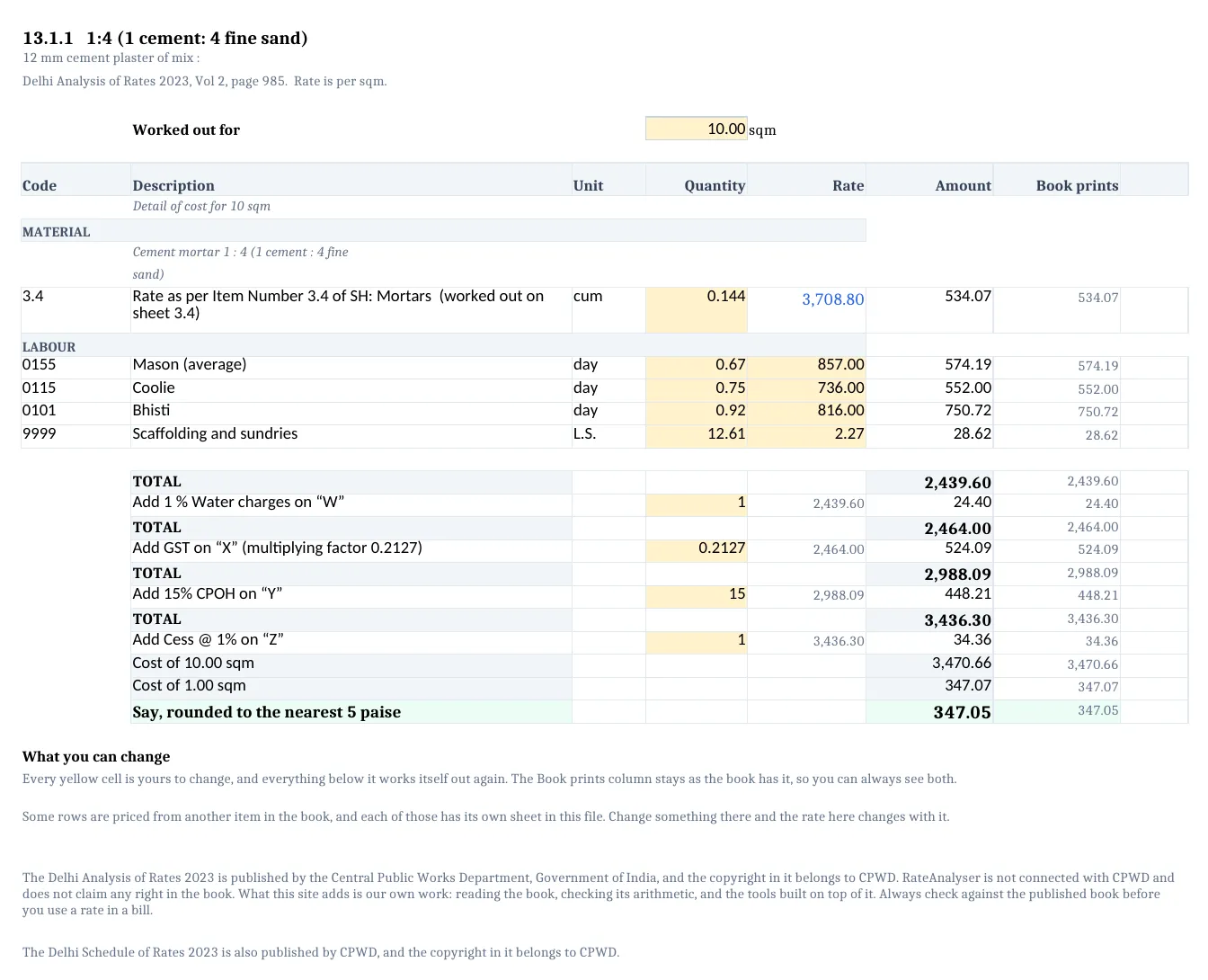
- Every yellow cell is yours to change: the quantities, the rates, an amount the book states as one sum, the percentage of each additional charge, the GST factor, and the cell Worked out for at the top. Everything below a yellow cell works itself out again.
- The column Book prints keeps the book's own amount for every line, so you can always see both.
- A line built from another item takes its rate from that item's sheet, in blue. Change something on that sheet and this one moves with it. In a few lines the book itself does not price the line at the item's own rate. Those lines are not joined, their rate is yellow, and the line says so.
- Each sheet has its own water, GST, profit and cess cells. A change on one sheet moves that sheet and the sheets that take their rate from it.
- The results of the formulas are stored in the file, so a phone, a preview or Google Drive show figures and not blanks.
- A file needs a pass or one of your free items, and each file counts in your daily limit, see Daily limits.
- Every printed page of the file names CPWD as the owner of the books.
- To check a whole Schedule of Work, the excel of a justification has a sheet for every item, see The justification excel.
How it is worked out
Every figure below a yellow cell is a formula. In 13.1.1, worked out for 10 sqm:
| Cell | Formula | Example |
|---|---|---|
| Amount of a line | Quantity x Rate, to the paisa | 0.75 x 736.00 = 552.00 |
| Water, profit or cess | Worked out on x Per cent / 100, to the paisa | 2,439.60 x 1 / 100 = 24.40 |
| GST | Worked out on x Factor, to the paisa | 2,464.00 x 0.2127 = 524.09 |
| Cost of 1 sqm | Cost of 10 sqm / Worked out for, to the paisa | 3,470.66 / 10 = 347.07 |
| Say | Cost of 1 sqm to the nearest 5 paise | 347.07 becomes 347.05 |
The Say is worked out as the cost divided by 0.05, rounded to a whole number, and multiplied by 0.05, so it opens the same in every version of excel.
If you see this message
This excel file has the full working of the rate, so you need to sign in first.
Press Sign in under the button. You come back to the same item with your changes.
This excel file has the full working of the rate. Buy a pass, or open this item with one of your 3 free items.
You cannot open this item yet. Press Buy a pass, or open the item free and then download.
files today, which is the daily limit, please come back tomorrow.
You have reached the limit of excel files for today. It starts again tomorrow, India time.
Something went wrong while making the file. Please try again.
Press the button again. If it keeps happening, write to us.
We could not reach our server, please check your internet and try again.
Check your internet and press the button again.
The Delhi Analysis of Rates 2023 is published by the Central Public Works Department, Government of India, and the copyright in it belongs to CPWD. RateAnalyser is not connected with CPWD and does not claim any right in the book. What this site adds is our own work: reading the book, checking its arithmetic, and the tools built on top of it. Always check against the published book before you use a rate in a bill.