How to follow a line
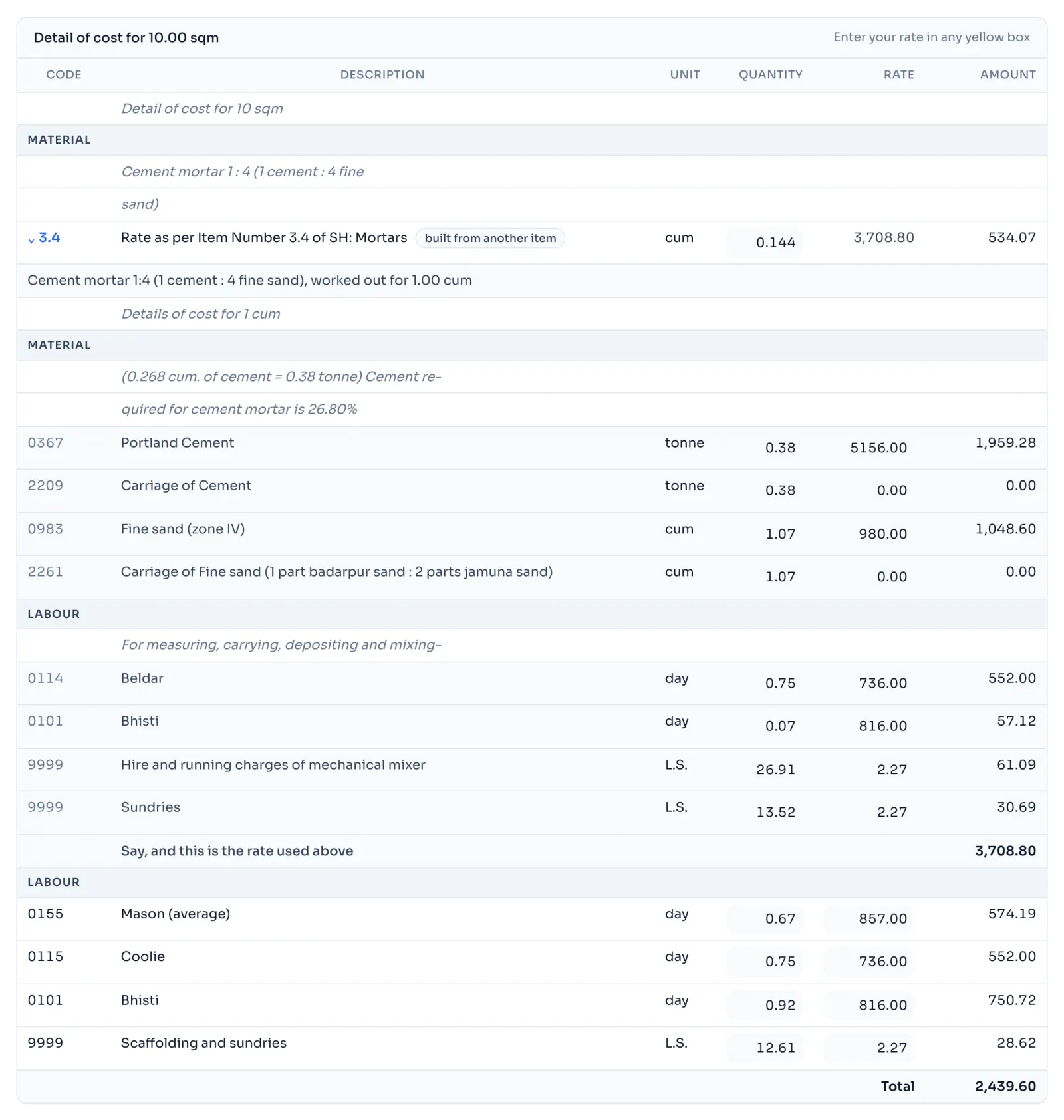
- In Detail of cost, find a line that has an arrow in front of its code, like › 3.4. Its description often starts with Rate as per Item Number, and a small label says built from another item.
- Press the arrow. The item opens under the line, shaded, with its own lines.
- At the end of it, the line Say, and this is the rate used above gives the rate that went into the line you opened.
- Press the arrow again to close it. Lines inside an item can open too, because an item can be built from an item that is built from another item, up to 4 levels down in this book.
Things to know
- The rate of such a line is not typed, because it is the Say of the item below it. Change something inside that item and the rate on the line changes by itself.
- You can still change the Quantity of the line, for example how much mortar the plaster takes.
- After a change, the label on the line says which item changed, like built from item 3.4, which changed.
- 1 free item opens the whole tree under it, so you see these lines without using more. What is free
- A change reaches the top. Change cement 0367 and mortar 3.4 changes, and 13.1.1 changes with it. Change one rate everywhere
How it is worked out
The line takes its amount from the Say of the item below it:
For the line for 3.4 on item 13.1.1, in cum:
| Line | Working | Amount |
|---|---|---|
| 3.4 cement mortar 1:4 | 0.144 x 3,708.80 | 534.07 |
The Say of 3.4 is its cost of 3,708.78 rounded to the nearest 5 paise. The amount goes into the Total of 13.1.1, so a change in 3.4 moves 13.1.1. If cement 0367 goes from 5,156.00 to 6,000.00 a tonne, 3.4 comes to 4,029.50, the line becomes 0.144 x 4,029.50 = 580.25, and the rate of 13.1.1 comes to 353.65.
If you see this message
built from another item as a small label beside the line
This line is priced from an item below it. Press the arrow to see that item.
Say, and this is the rate used above under the item you opened
This is the finished rate of the item, and it is the rate on the line above.
Rate printed in the book, and this is the rate used above under an item the book works out backwards
This item cannot be worked out again, so the line keeps the rate the book prints. When the book does not add up
The Delhi Analysis of Rates 2023 is published by the Central Public Works Department, Government of India, and the copyright in it belongs to CPWD. RateAnalyser is not connected with CPWD and does not claim any right in the book. What this site adds is our own work: reading the book, checking its arithmetic, and the tools built on top of it. Always check against the published book before you use a rate in a bill.