Typing in the Rate box of one line changes that line only. This page is about the other way, where one change reaches every line that uses the same basic rate, in the item you opened and in the items below it.
How to change a rate everywhere
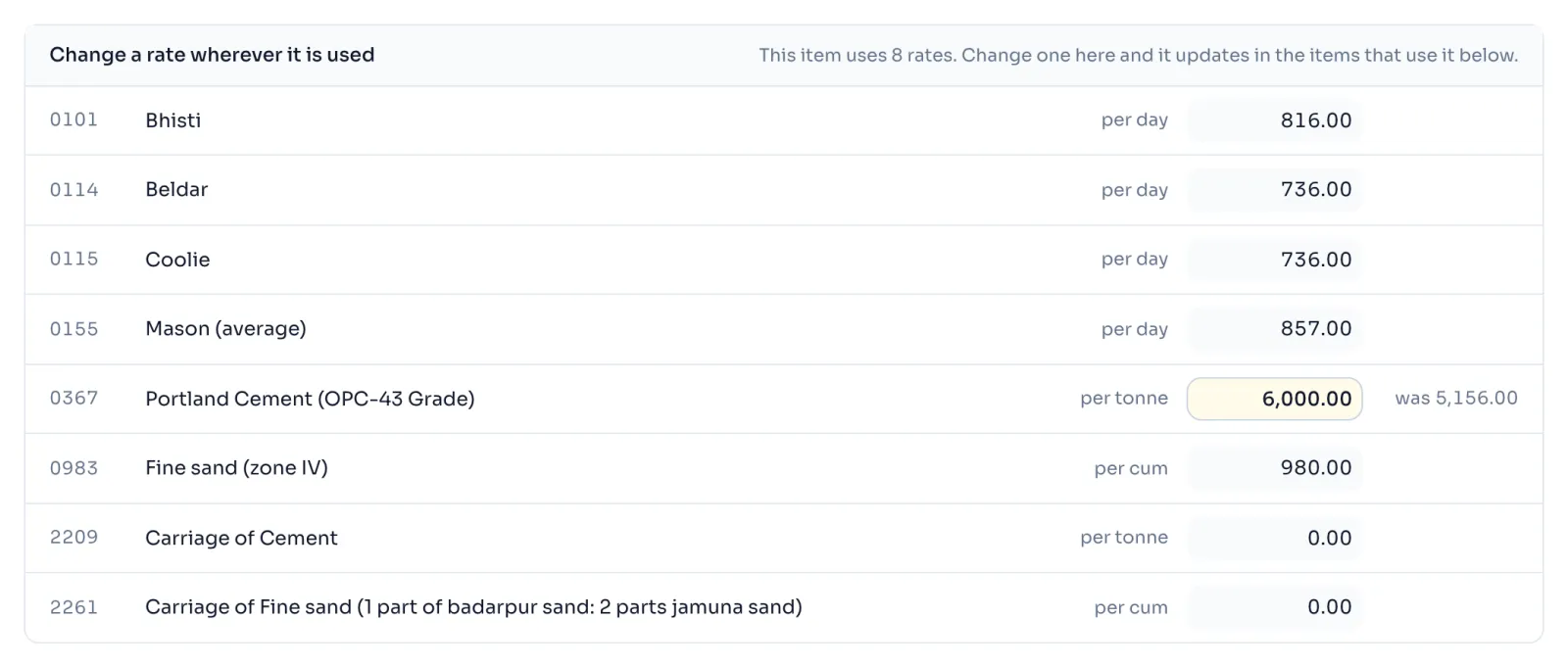
- Open an item with your pass or one of your free items. Above the table is the panel Change a rate wherever it is used, with every rate the item uses. Each has its code, its name, its unit and a box with the book's rate, for example 0367 Portland Cement (OPC-43 Grade) per tonne.
- Type the new rate in the box. Beside it, was and the book's rate appear to remind you.
- Every line that uses that rate is worked out again, including the lines in the items this one is built from, and the rate at the top moves.
- For the charges added after the lines, use the boxes in the column Per cent or factor of the table Additional charges: water charges, GST, contractor's profit and overheads, and labour cess.
Things to know
- Lines for sundries, carriage, and carriage and sundries (codes 9999, 9977 and 9988) are not offered as rates. They are lump sums that every analysis prices the same way, so the only thing you can change on them is the quantity of the line.
- The four boxes for water charges, GST, profit and cess apply to the whole item and every item it is built from. The screen says every item in this tree uses the same water, GST, profit and cess figures.
- GST here is a factor, not a percentage. On nearly every item the book multiplies by 0.2127, so type a factor and not 18. If you type 18 on 13.1.1, its rate jumps from 347.05 to 5,437.70.
- The box Worked out for changes the quantity one item is worked out for, and only that item.
- The panel says how many rates the item uses, and a change here updates in the items that use it below.
- Press Put everything back to the book to undo all of it, see Change a quantity or rate.
- Always check against the published book before you use a rate in a bill.
How it is worked out
Cement 0367 is used on a line of mortar 3.4, and the plaster 13.1.1 is built from 3.4. So one change moves 3 things, one after the other. The home page of RateAnalyser plays this same change.
First, 3.4, worked out for 1 cum, with cement at 6,000.00 a tonne instead of 5,156.00:
| Step | The book | Cement at 6,000.00 |
|---|---|---|
| Portland Cement, 0.38 tonne | 0.38 x 5,156.00 = 1,959.28 | 0.38 x 6,000.00 = 2,280.00 |
| Cost of 1 cum, the total of Detail of cost | 3,708.78 | 4,029.50 |
| Say, to the nearest 5 paise | 3,708.80 | 4,029.50 |
Then 13.1.1, worked out for 10 sqm. Its line for mortar takes the new Say of 3.4:
| Step | The book | Cement at 6,000.00 |
|---|---|---|
| Mortar 3.4, 0.144 cum | 0.144 x 3,708.80 = 534.07 | 0.144 x 4,029.50 = 580.25 |
| Total of Detail of cost | 2,439.60 | 2,485.78 |
| Water charges, 1% | 24.40 | 24.86 |
| GST, factor 0.2127 | 524.09 | 534.01 |
| Contractor's profit and overheads, 15% | 448.21 | 456.70 |
| Labour cess, 1% | 34.36 | 35.01 |
| Cost of 10 sqm | 3,470.66 | 3,536.36 |
| Cost of 1 sqm | 347.07 | 353.64 |
| Say, to the nearest 5 paise | 347.05 | 353.65 |
So cement at 844.00 more for a tonne makes 3.4 cost 320.70 more for a cum, and 13.1.1 cost 6.60 more for a sqm, which is 1.90% above the book.
If you see this message
is not in this book, so the printed rate is used as on a line, in small letters
The line is priced from an item that this book does not hold. Its printed rate is used, so a change below it cannot reach this line.
because they belong to a different item or to a line that carries no figure. at the foot of What you changed
Those changes belong to another item, so they are left out of this one.
The Delhi Analysis of Rates 2023 is published by the Central Public Works Department, Government of India, and the copyright in it belongs to CPWD. RateAnalyser is not connected with CPWD and does not claim any right in the book. What this site adds is our own work: reading the book, checking its arithmetic, and the tools built on top of it. Always check against the published book before you use a rate in a bill.