You sign in to search the book and to open full analyses. Reading the rate of an item needs no account, so a link from Google opens without signing in.
How to sign in
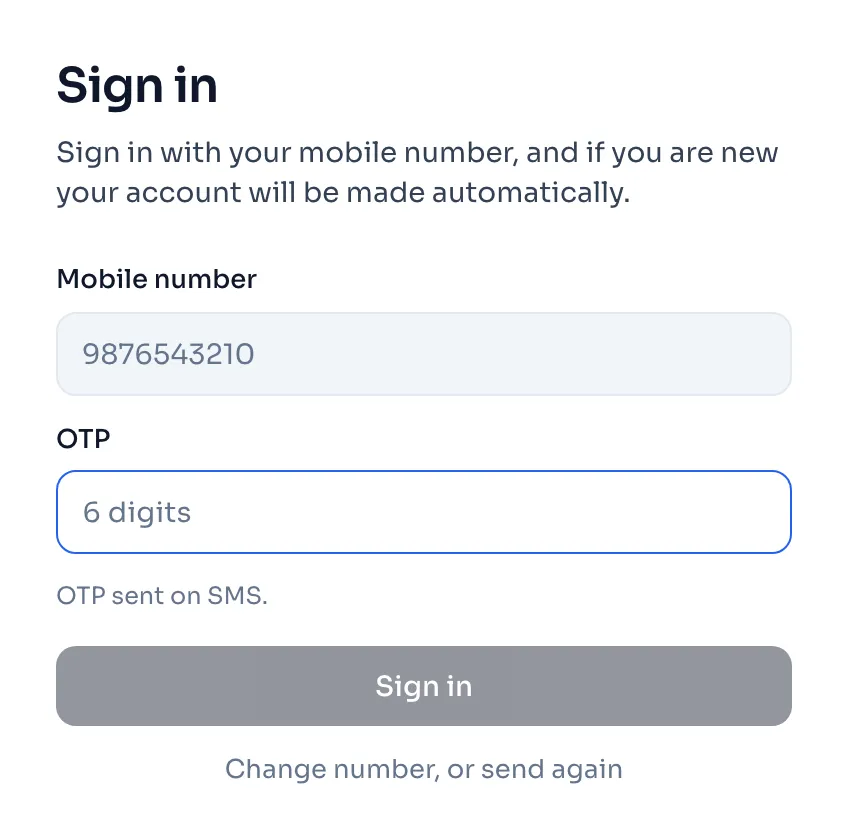
- Open the sign in page and type your Mobile number.
- Press Send OTP. An SMS comes with a 6 digit OTP.
- Type it in the OTP box and press Sign in.
- If this number has no account yet, the page tells you the number is confirmed. Type Your name and press Create account, and the same OTP is used, so you do not wait for a second SMS.
Things to know
- Only Indian mobile numbers work, 10 digits starting with 6, 7, 8 or 9. You can type +91 or a 0 in front, it is read the same way.
- An OTP works for 10 minutes and only once, and a new OTP stops the one before it.
- If the OTP does not come, wait a moment and press Change number, or send again.
- A sign in lasts 30 days on that phone or computer, and then you sign in again with a new OTP.
- One account works on a fixed number of devices at a time, and when you sign in on one more, the device you used longest ago is signed out. Devices and signing out
- You land on the page you were going to open, or on Search. A new number can open 3 items free. What is free
If you see this message
That OTP is not right.
Check the 6 digits in the SMS and type them again.
That OTP has expired. Please ask for a new one.
Press Change number, or send again and a new OTP comes by SMS.
Too many wrong tries. Please ask for a new OTP.
The OTP stops working after too many wrong tries. Ask for a new one and type it carefully.
An OTP was just sent. Please wait a moment before asking for another.
The last SMS may still be on its way. Wait a little, then ask again.
Too many OTPs were sent to this number. Please try again in an hour.
Wait an hour and try again, or write to us if you need to get in sooner.
Please enter a 10 digit Indian mobile number.
Check the number. RateAnalyser sends OTPs to Indian mobile numbers only.
You were signed out here because your account was opened on another device, and one account works on 2 devices at a time.
Sign in again with a new OTP. This signs out the device you used longest ago.