The link that carries your changes is still there, and Saved is the other way to keep them. A saved item is kept in your account, so you do not have to look for an old message to find it.
How to save
- Open an item with your pass or one of your free items, and change a quantity or a rate. Change a quantity or rate
- Press Save changes. It shows next to Copy link to send after you change something. A box opens under it, Give these changes a name.
- Type a name, for example site rates, and press Save. The page says that it is saved with your name, and has a link See Saved.
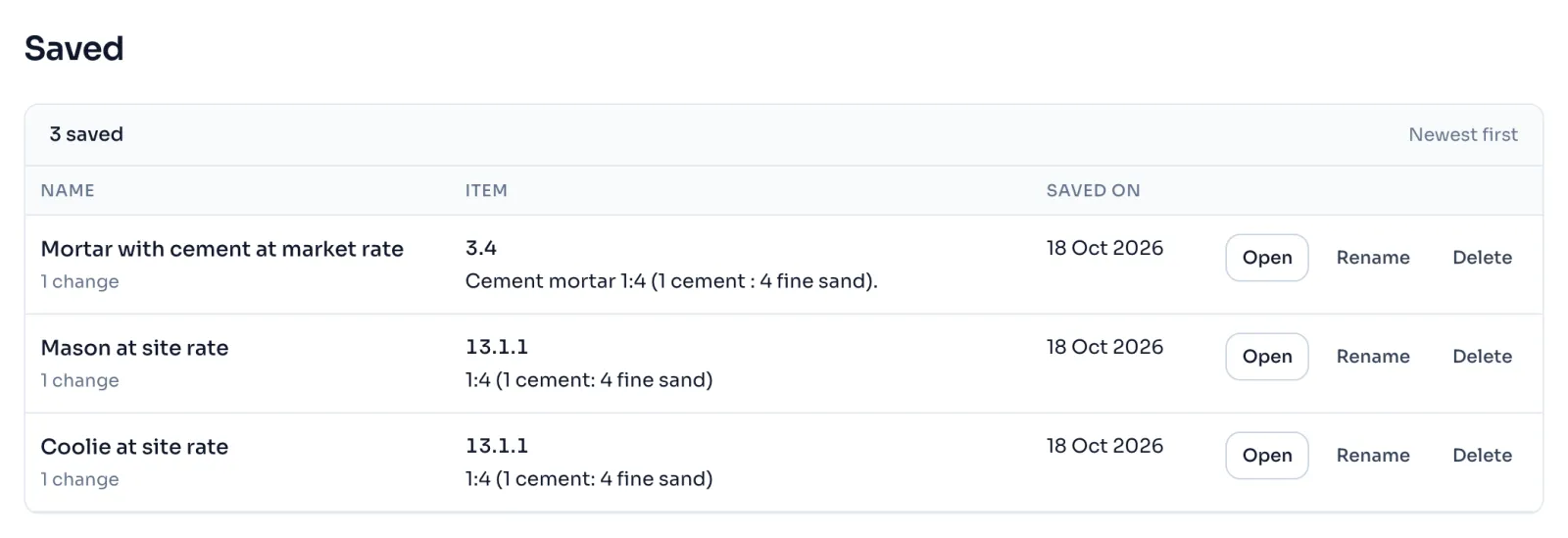
- To open it again, press Saved in the side menu. The list shows the name, the item and the day, and each line has Open, Rename and Delete.
Things to know
- Open shows the item with your changes in place, the same as the link would. The book is not changed.
- You can keep up to 200 saved items, and a name can have 80 letters.
- Delete asks first, and it is for good.
- You can save only on an item you can change, so you need a pass or the item opened with one of your free items, see What is free.
- Inside a justification, your changes are kept in the justification itself, so there is no Save changes there.
- A saved line whose item is no longer in the book says so, and you can still rename it or delete it.
- Your saved changes are in your account only. Our Privacy policy says what we keep.
If you see this message
Please give it a name.
Type a name before you press Save.
Buy a pass, or open this item with one of your 3 free items, to save changes.
Press Open free on this item, or buy a pass, and then save.
already, which is the most that can be kept. Please delete one from Saved first.
Delete a saved line you do not need, then save again.
Nothing saved yet
When you change a rate on an item, press Save changes and give it a name, and it will be kept here.
Delete this for good?
Press Yes, delete to remove it, or Keep it.