The PDF is the paper you sign, and the excel is the one on the side, for working with. Your decision and your remark for each item are only in the excel.
How to download it
- Open the justification and press Excel, next to Download PDF.
- While the file is made, the button says Making your excel, and your last change is saved first so the file has it.
- Your browser saves a file named Justification and the name of your work. Open it in excel or on your phone.
The sheets
| Sheet | What it has |
|---|---|
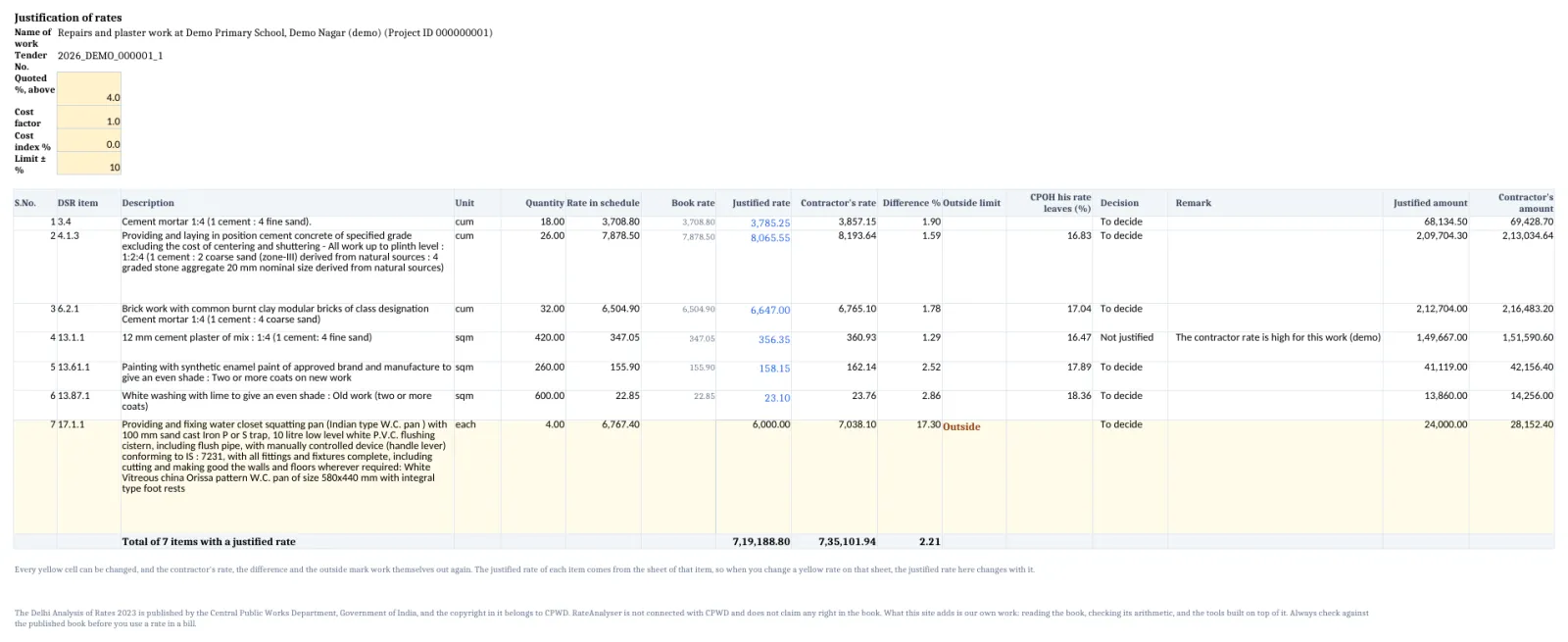
| Justification | At the top, the name of work, the tender number, and the yellow cells Quoted %, Cost factor, Cost index % and Limit ± %. Under them, a row for every item with its justified rate, the contractor's rate, the difference, the CPOH his rate leaves, your Decision and your Remark, and the totals. |
| Market rates | The market rates you typed, with the book's rate beside each, kept for your record. |
| One sheet for each item | The working of the item at your market rates, as in Download the excel, and the working turned back from the contractor's rate. The sheets of the items it is built from follow. |
Things to know
- The justified rate on the Justification sheet is linked to the Say of that item's own sheet. Change a yellow rate on the item's sheet, and the justified rate, the difference, the outside mark and the totals move with it.
- The contractor's rate, the difference and the outside mark are formulas over the yellow cells at the top. Type another quoted percentage there, and every row moves.
- The Market rates sheet moves nothing. To try a rate, change the yellow rate on the sheet of the item.
- A justified rate you typed by hand, your decisions and your remarks are written in the file. They are yours, and no formula changes them.
- For a few items the book lists the charges in another order, and for those the CPOH his rate leaves is a number that RateAnalyser worked out. It does not change when you change a rate.
- The results of the formulas are stored in the file, so a phone, a preview or Google Drive show figures and not blanks. Excel works them out again when you open it.
- Each sheet carries the note that the book is published by CPWD. The file counts as 1 of your daily files, see Daily limits.
How it is worked out
The contractor's rate of a row is its rate in the schedule with the cost factor, the cost index and the quoted percentage applied, in that order, and rounded to the paisa. For a quote below the estimate, the last part is 1 less the percentage.
With made up figures:
| Cell | Figure |
|---|---|
| Rate in schedule | 200.00 |
| Cost factor | 0.95 |
| Cost index % | 5 |
| Quoted %, above | 4 |
| Contractor's rate | 207.48 |
200.00 x 0.95 = 190.00, x 1.05 = 199.50, x 1.04 = 207.48.
If you see this message
Making your excel on the button
The file is being made. Keep the page open.
Your last change is saved first, so the under the buttons
The file will have your last change in it.
files today, which is the daily limit, please come back tomorrow.
You have used all your files for today. Come back tomorrow, India time.
The Delhi Analysis of Rates 2023 is published by the Central Public Works Department, Government of India, and the copyright in it belongs to CPWD. RateAnalyser is not connected with CPWD and does not claim any right in the book. What this site adds is our own work: reading the book, checking its arithmetic, and the tools built on top of it. Always check against the published book before you use a rate in a bill.