A pass is for one person, so do not share your account. A sign in lasts 30 days on a device, and after that you sign in again with a new OTP.
How to sign a device out
- Open your account page, see Your account page.
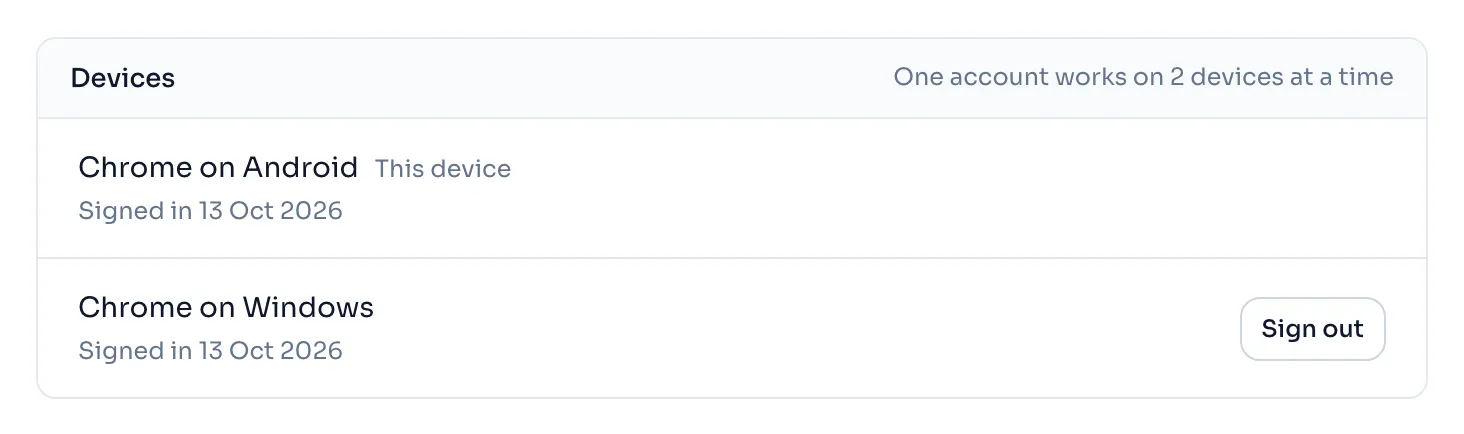
- In the panel Devices, each line shows the browser and the system, for example Chrome on Android, and the day it signed in. The line of the device you are holding says This device.
- Press Sign out beside any other device. It is signed out at once.
- To sign out the device you are holding, press Sign out at the foot of the page. You land on the sign in page, and it says you are signed out.
Things to know
- When you sign in on a third device, the one you used longest ago is signed out, and not the one you use every day. So a new phone pushes out the office computer you forgot about.
- A device that was signed out shows a notice at the top with OK and Sign in again. Press OK to clear the notice, or Sign in again to sign in with a new OTP.
- Sign out when you finish on a computer that others use.
- Signing out one device does not touch the others.
- The list shows the browser and the system only to tell a phone from a computer. It is not used for anything else.
If you see this message
You were signed out here because your account was opened on another device, and one account works on 2 devices at a time.
A third device signed in and this one was the one used longest ago. Sign in again if you want this device back, and another one will be signed out.
You were signed out here from your account page on another device.
You, or someone with your account, pressed Sign out beside this device on another device. Sign in again with a new OTP.
You are signed out.
You pressed Sign out on this device. Sign in again with your mobile number.