The decision is yours. RateAnalyser shows what the contractor's rate leaves for his profit and overheads, and you say if that is enough for the work.
How to decide an item
- In the table Items, press Detailed justification under the description of an item, or press its code.
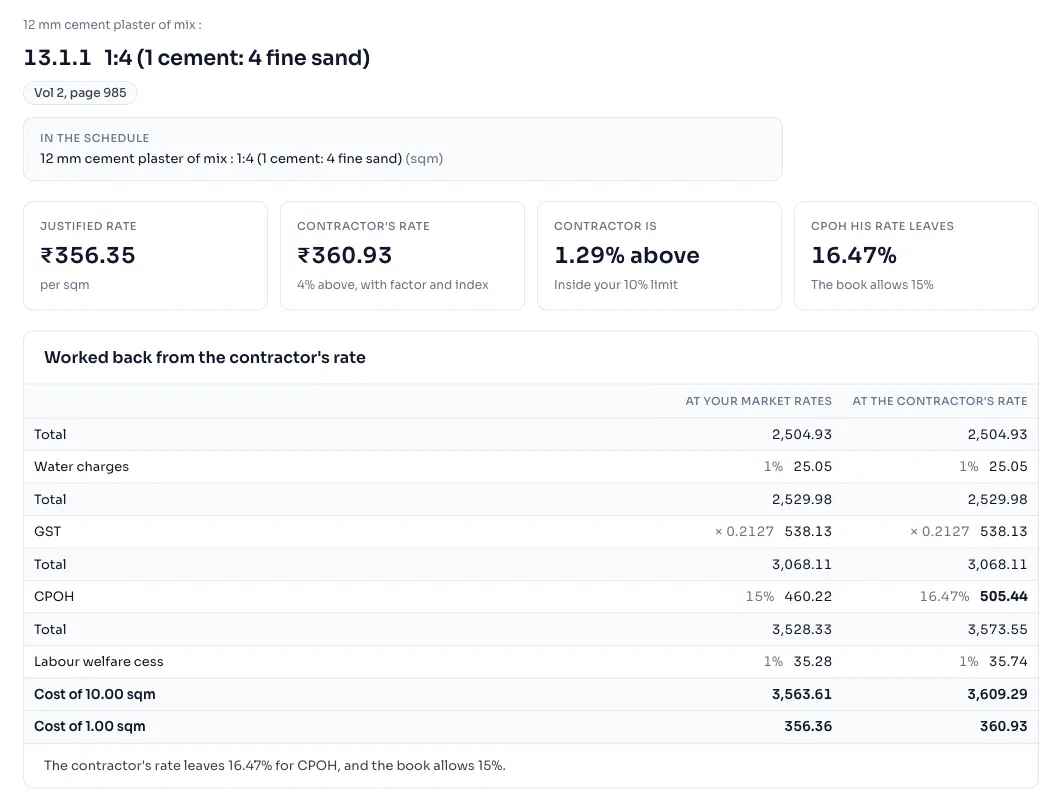
- Read the four tiles: Justified rate, Contractor's rate, Contractor is with a line that says if it is outside your limit or inside it, and CPOH his rate leaves, with the percentage the book allows under it.
- Read the table Worked back from the contractor's rate. The column At your market rates is the item in the book's order of steps, and the column At the contractor's rate is the same steps worked back from his rate. The last line says how much he is left for CPOH.
- Under Your decision, choose Justified or Not justified, and write the reason in the box Remark. Both are saved as you go, and Clear decision takes the decision back.
- Press Next item and Previous item to go through the schedule in the order it is printed, and Back to the justification when you are done.
Things to know
- CPOH his rate leaves is the contractor's profit and overheads that remain when the cost of the item is taken out of his rate. The book allows 15% for it, and a figure far below that means his rate is low.
- The page also has the same boxes as an item page, to try a quantity or a rate of this item. Change a quantity or rate What you change is saved in this justification, and the water, GST, CPOH and cess figures are the same for every item.
- Your decisions show on the justification page in the column Decision, and the line over the table says how many items are decided. The list of justifications says how many are still to decide.
- Your decision and your remark are in the excel, in the columns Decision and Remark. They are not printed on the PDF.
- Each item page you open counts as 1 view in your daily limit, see Daily limits.
- An item with no analysis has no working to show. Type its justified rate in the yellow box, and it joins the totals.
How it is worked out
The book adds its charges one after the other. To turn the working back, RateAnalyser takes the contractor's rate for the batch, takes the cess out, and sees how much is left above the total before CPOH.
With made up figures for a batch of 10 units, water 1%, GST factor 0.2127, CPOH 15% and cess 1%, the item at your market rates is worked out like this:
| Step | Amount |
|---|---|
| Total of the lines | 1,000.00 |
| Water charges, 1% | 10.00 |
| GST, factor 0.2127 | 214.83 |
| Total before CPOH | 1,224.83 |
| CPOH, 15% | 183.72 |
| Labour cess, 1% | 14.09 |
| Cost of 10 units | 1,422.64 |
| Rate for 1 unit | 142.25 |
The contractor's rate is 140.00 for 1 unit, which is 1,400.00 for 10. Less the cess, that is 1,386.14, and less the 1,224.83 before CPOH it leaves 161.31 for CPOH. That is about 13.2% of 1,224.83, against the 15% of the book. The screen works to the paisa at every step, so its second decimal can differ a little.
If you see this message
for CPOH, and the book allows under the table Worked back from the contractor's rate
The sentence says how much CPOH his rate leaves and how much the book allows.
below the cost of this item, even with no CPOH. in yellow under the table
His rate is lower than the cost of the item at your market rates, so it leaves nothing for CPOH.
This item's analysis has no CPOH line, so only the difference is shown.
This item has no CPOH to work back, so use the difference between the two rates.
This item's working in the book does not add up, so it cannot be worked back from the contractor's rate.
The book's own figures for this item do not close. Check the published book.
This item is left out of the totals until you type its justified rate.
Type the justified rate in the yellow box on this page.
Daily limit reached in place of the working
You have opened all the items for today. Come back tomorrow, India time, see Daily limits.
The Delhi Analysis of Rates 2023 is published by the Central Public Works Department, Government of India, and the copyright in it belongs to CPWD. RateAnalyser is not connected with CPWD and does not claim any right in the book. What this site adds is our own work: reading the book, checking its arithmetic, and the tools built on top of it. Always check against the published book before you use a rate in a bill.