What is on the page
- At the top right are the buttons Download PDF and Excel. The JOR PDF
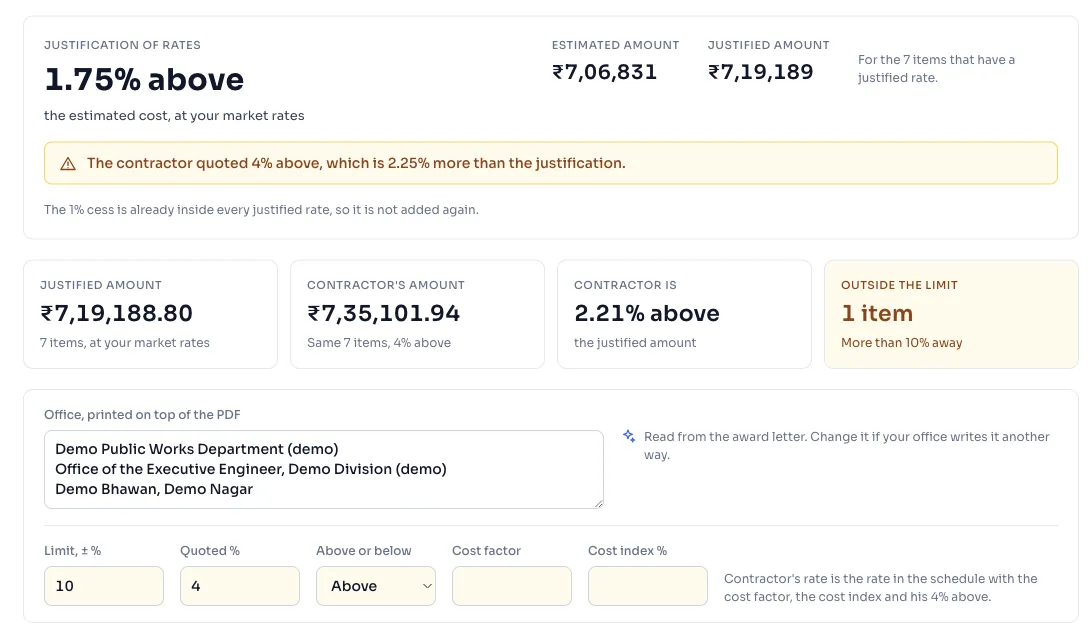
- The panel Justification of rates has one figure, like 2.50% below, for the whole tender. It says how far the justified amount is from the estimated cost, and beside it are the Estimated amount and the Justified amount. When you have typed the quoted percentage, a line says if the contractor's quote is inside the justification or how much more it is.
- Four tiles: Justified amount, Contractor's amount, Contractor is above or below the justified amount, and Outside the limit, with the number of items that are more than your limit away.
- A row of boxes: Office, printed on top of the PDF, Limit, ± %, and for a tender with one percentage Quoted %, Above or below, Cost factor and Cost index %.
- The panel Market rates. Enter market rates
- The table Items, with a row for each item: S.No., DSR item, Description, Unit, Quantity, Book rate, Justified rate, Contractor's rate, Difference, CPOH his rate leaves and your Decision. A row outside the limit is yellow with a warning mark.
Things to know
- The Justified rate is the item worked out again from the Delhi Analysis of Rates 2023 at your market rates. An item with no analysis shows a yellow box where you type its justified rate, and it is left out of the totals until you do.
- The Contractor's rate is the rate in the schedule when he wrote a rate for each item. When he quoted one percentage, it is the rate in the schedule with the cost factor, the cost index and his percentage applied.
- An item is outside the limit when the contractor's rate is more than your limit above or below the justified rate. The limit is yours to change.
- When the quote is higher than the justification, the line is yellow, and when it is the same or lower, it is green. Until you type the quoted percentage, the line asks for it.
- For a tender with a rate for each item, the panel compares the contractor's rates with the justified rates, and the PDF sets them side by side the same way.
- The 1% cess is already inside every justified rate, so the page does not add it again.
- Every figure is worked out by RateAnalyser from the book, and AI makes none of them.
How it is worked out
The Justification of rates figure is worked on the items that have a justified rate, and only those, so both amounts are made from the same items.
The difference of one item is worked in the same way, from the two rates.
With made up figures:
| Figure | |
|---|---|
| Estimated amount | 20,00,000 |
| Justified amount | 19,50,000 |
| Justification of rates | 2.50% below |
| The contractor quoted | 4% above |
| How much more than the justification | 6.50% |
| Justified rate of an item | 200.00 |
| Contractor's rate of that item | 230.00 |
| Difference | 15.00% above, outside a limit of 10% |
If you see this message
Type the quoted percentage below to compare the contractor's quote with this. in the panel Justification of rates
Type the Quoted % and choose Above or Below.
No item has a justified rate yet. in the panel Justification of rates
Every item is left out for now. Type a justified rate for the items with no analysis, or check the codes.
is left out of the totals until you type its justified rate. under the table of items
The item has no analysis in the book. Type its justified rate in the yellow box in its row.
We could not work out this justification
The mistake is on our side, and nothing you typed is lost. Press Try again after a minute.
The Delhi Analysis of Rates 2023 is published by the Central Public Works Department, Government of India, and the copyright in it belongs to CPWD. RateAnalyser is not connected with CPWD and does not claim any right in the book. What this site adds is our own work: reading the book, checking its arithmetic, and the tools built on top of it. Always check against the published book before you use a rate in a bill.