You need a pass, or one of your 3 free items, to open the full analysis of an item. Nothing you type changes the book. You are only trying a figure to see what it does to the rate, and your changes are kept in your account only when you press Save changes, see Save your changes under a name.
How to change a line
- Open an item with your pass or one of your free items, for example 13.1.1.
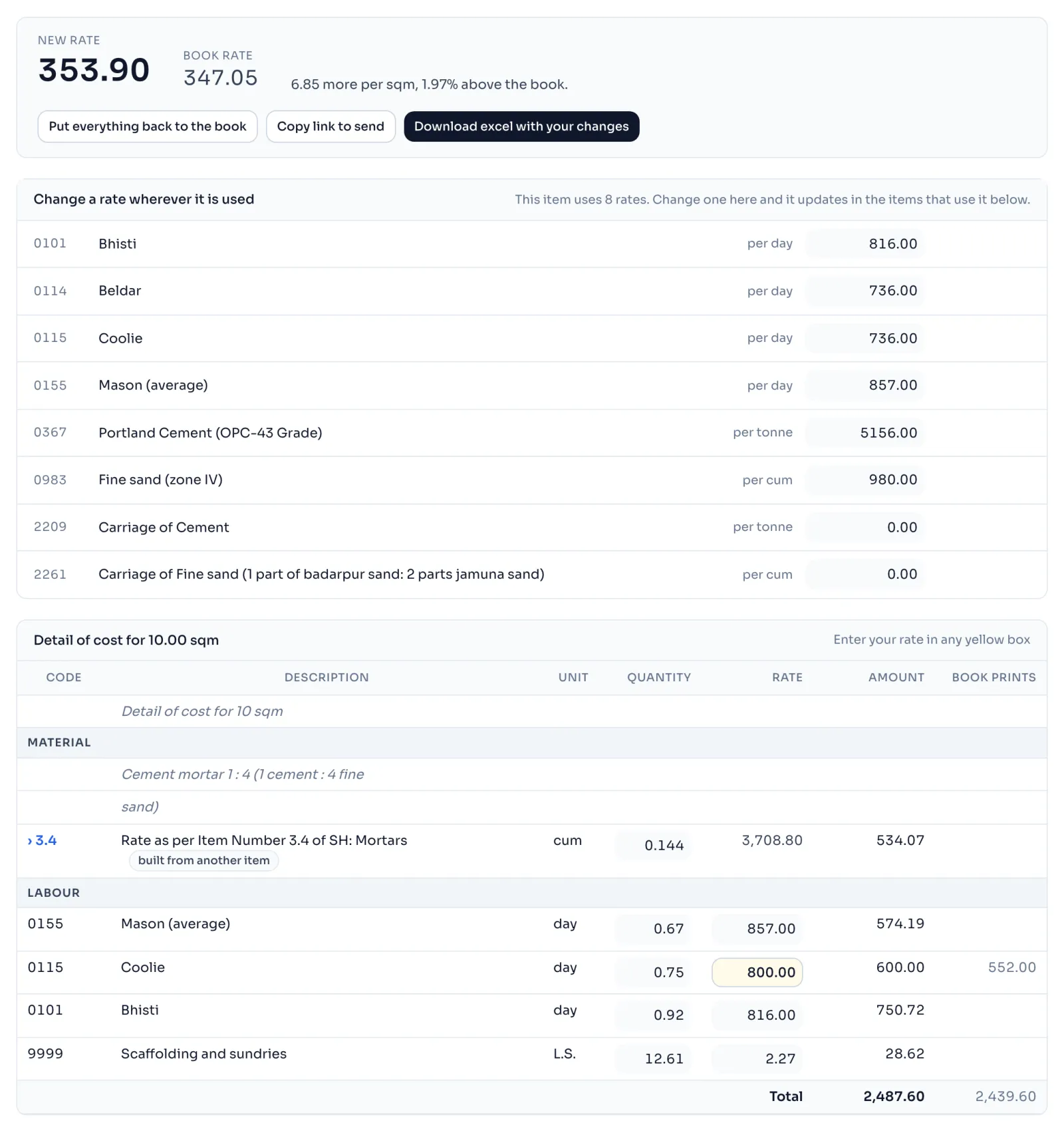
- In the table Detail of cost, click a figure in the Quantity or Rate column and type your own. A box you have changed turns yellow.
- At the top, New rate shows the rate with your change, Book rate shows the book's rate beside it, and one sentence says how much more or less it is for each unit.
- A column Book prints appears, with the book's own amount against every line you changed.
- To undo, press Put it back against one change in the list What you changed, which takes it out of the sums, or press Put everything back to the book, which puts the book's figure back in every box.
Things to know
- You can type 6,000 or 6000. A comma, a space or the rupee sign is fine. Something that is not a figure changes nothing, and a box you empty goes back to the book's figure.
- Some lines are one amount that the book states with no working. They say the book states this amount and prints no working, and they have only an Amount box.
- A line with the badge built from another item has a Quantity box, but its Rate is worked out from that item. Press the arrow beside its code to open that item and change its lines.
- One item can hold at most 60 changes.
- The water, GST, profit and cess boxes in Additional charges work for the whole item, see Change one rate everywhere.
- Your changes stay in the address of the page, see Send your changes by link, and you can save them under a name, see Save your changes under a name.
- Always check against the published book before you use a rate in a bill.
How it is worked out
A line is its quantity times its rate. After the lines are added, the book adds each additional charge on the running total, divides the cost down to 1 unit, and rounds it to the nearest 5 paise.
For 13.1.1, worked out for 10 sqm, with the Coolie rate changed from 736.00 to 800.00:
| Step | The book | With your change |
|---|---|---|
| Coolie, 0.75 day | 0.75 x 736.00 = 552.00 | 0.75 x 800.00 = 600.00 |
| Total of Detail of cost | 2,439.60 | 2,487.60 |
| Water charges, 1% | 24.40 | 24.88 |
| GST, factor 0.2127 | 524.09 | 534.40 |
| Contractor's profit and overheads, 15% | 448.21 | 457.03 |
| Labour cess, 1% | 34.36 | 35.04 |
| Cost of 10 sqm | 3,470.66 | 3,538.95 |
| Cost of 1 sqm | 347.07 | 353.90 |
| Say, to the nearest 5 paise | 347.05 | 353.90 |
The sentence at the top then reads 6.85 more per sqm, 1.97% above the book. Cost of 1 sqm is 3,538.95 / 10 = 353.895, which is 353.90 to the paisa.
If you see this message
because the book's own figures do not add up on this page. Please check the published book before you use this rate in a bill. in a yellow band above the table
The sums printed on this page of the book do not close, so our working and the printed rate differ even before you change anything. Check the published book.
figures, which is as many as one item can hold. under the buttons
You have reached the limit. Press Put it back against one change, then carry on.
We cannot work this rate out again
The book works this item out in a way we cannot follow. Use the rate printed in the book.
The Delhi Analysis of Rates 2023 is published by the Central Public Works Department, Government of India, and the copyright in it belongs to CPWD. RateAnalyser is not connected with CPWD and does not claim any right in the book. What this site adds is our own work: reading the book, checking its arithmetic, and the tools built on top of it. Always check against the published book before you use a rate in a bill.