The rates come from the analyses of the items in your schedule. Each rate is listed once, even if ten items use it, so you type cement once.
How to enter the rates
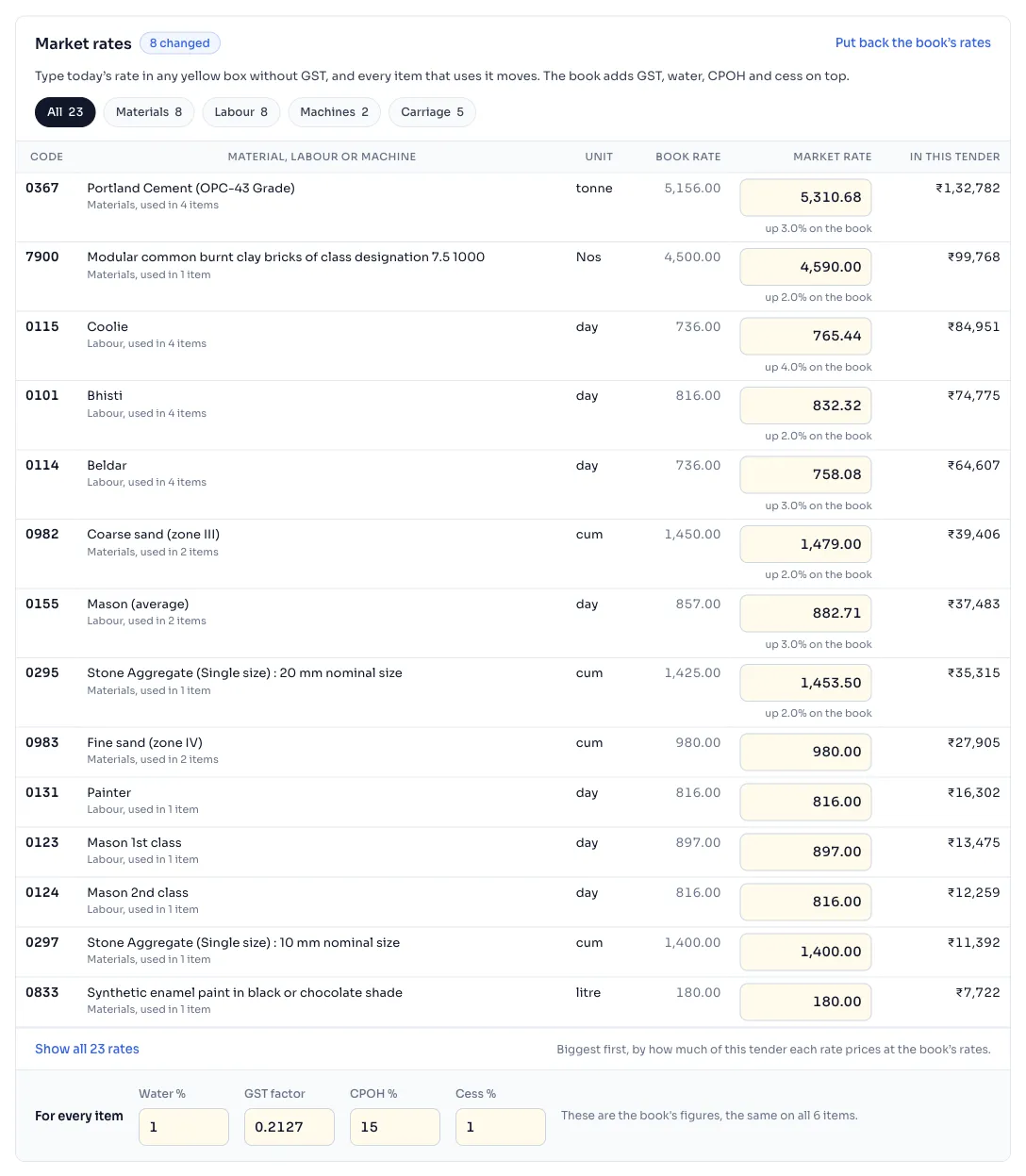
- Open the justification you made. Find the panel Market rates. It lists every material, labour and machine rate your items are priced from, the biggest first by how much of this tender each rate prices at the book's rates.
- Use the tabs All, Materials, Labour, Machines and Carriage to find a rate, and press the line that starts with Show all to see the rest of a long list.
- Type today's rate in the yellow box in the column Market rate, without GST. Under the box, the page says how far it is up or down on the book, and a badge next to the heading counts the rates you changed. The last column, In this tender, says how much of this tender the rate prices.
- Under For every item are 4 figures that are the same for all items: Water %, GST factor, CPOH % and Cess %. They start at the book's own figures, and you change them only if your office works them another way.
- Above the market rates, the box Limit, ± % starts at 10% and decides which items are marked outside the limit. Change it if your office uses another limit.
- To go back, press Put back the book's rates or Put back the book's figures.
Things to know
- One market rate moves every item that uses it, and the four For every item figures move all items. The page says Working out the rates… for a moment and then shows the new figures.
- Type the rate without GST. The book adds GST, water, CPOH and cess on top, the same as it does for the book's own rate.
- Everything you type is saved in this justification only. Nothing changes in the book and in your other justifications.
- A rate that is the same as the book's is not counted as a change.
- A justification can hold a very long list of changes. If you reach the end, the page asks you to put something back first.
- The items that have no analysis in the book have no rates here. Type their justified rate beside the item, in the table of items. Read the justification
How it is worked out
Under a rate you typed, the page says how far it is from the book, in per cent.
With made up rates:
| Book rate | Market rate | The page says |
|---|---|---|
| 500.00 | 575.00 | up 15.0% on the book |
| 1,000.00 | 900.00 | down 10.0% on the book |
The justified rate of each item is the whole analysis of that item worked out again with your rate in place of the book's rate.
If you see this message
in any yellow box without GST, and every item that uses it moves. under the heading Market rates
Type the rate without GST. The book adds GST on top.
figures, which is as many as one justification can hold. Put something back before you change anything else. in a yellow band
Press Put back the book's rates or Put back the book's figures, then carry on.
We could not work the rates out just now, so the figures below may be old. in a yellow band, with Try again
Press Try again. Nothing you typed is lost.
The Delhi Analysis of Rates 2023 is published by the Central Public Works Department, Government of India, and the copyright in it belongs to CPWD. RateAnalyser is not connected with CPWD and does not claim any right in the book. What this site adds is our own work: reading the book, checking its arithmetic, and the tools built on top of it. Always check against the published book before you use a rate in a bill.