No justified rate is worked out on this page. It is only for making sure the rows, the codes and the quote are right, because everything after it is built on them.
How to check the rows
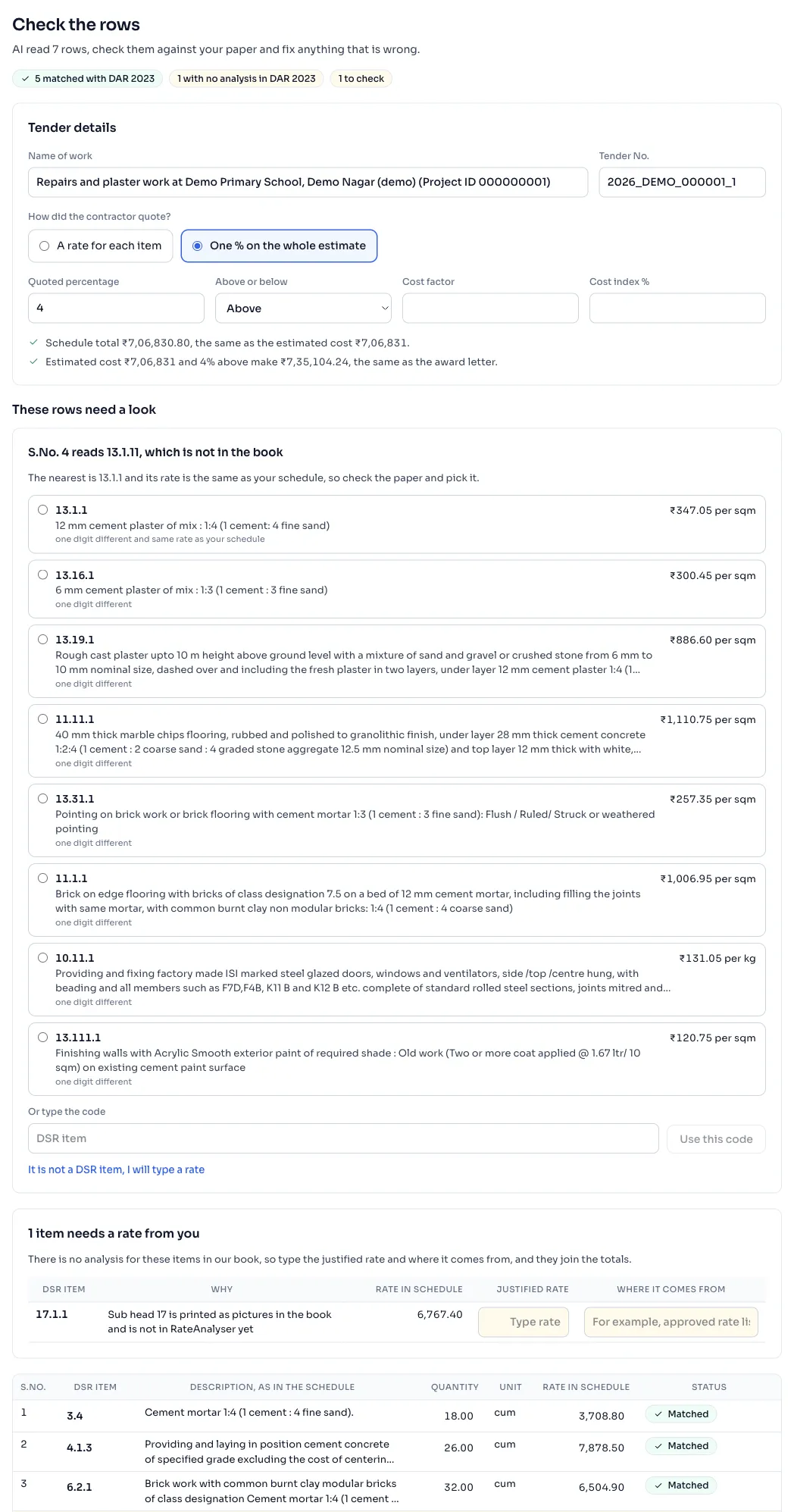
- Read the line under the heading Check the rows. It says how many rows AI read, so count them against your paper. The badges beside the heading say how many rows are matched with DAR 2023, and how many are to pick or to check.
- Under Tender details, check Name of work and Tender No.
- Under How did the contractor quote?, choose A rate for each item or One % on the whole estimate. For one percentage, check Quoted percentage, Above or below, Cost factor and Cost index %. If AI read your award letter they are filled in, and if not, type them from your papers.
- Read the lines under the figures. A tick means the schedule adds up to the estimated cost of the award letter, and that the estimate with the quoted percentage makes the tendered amount. A warning means a row or a figure is not right.
- Fix the rows that need a look. A card shows for each one: pick the printing with the same rate as your paper when the book prints a code more than once, or pick the nearest item, or type the code from your paper and press Use this code.
- If the page says that items need a rate from you, those items have no analysis in the book. Type the Justified rate for each one, and write where the rate comes from.
- Press Make justification.
Things to know
- The rate in your schedule is never changed by the book. In a tender with a rate for each item, it is the contractor's own rate.
- The Cost factor and the Cost index % are in your tender papers. If there are none, leave the boxes empty.
- You can change the code, the quantity or the rate of any row in its own box in the table. Every change is saved as you make it, so leaving the page loses nothing.
- Items from sub head 17 and carriage items have no analysis in the book yet, and approved items and market items have none at all. They stay out of the totals until you type their justified rate.
- Press Read again to go back and read another file. The justification you have not made stays in your list with the badge Check the rows, and Delete this justification at the foot removes it.
- Once you press Make justification, you come to the justification itself. Read the justification
If you see this message
We picked the one with the same rate as your schedule, change it if it is wrong. on a card about a code the book prints twice
Look at your paper. If the rate on it is for the other printing, choose that one.
is not in DSR 2023, please check your paper. under the box Or type the code
The code you typed is not in the book. Check it against your paper.
There is no analysis for these items in our book, so type the justified rate and where it comes from, and they join the totals. over a table of items
Type the justified rate in the yellow box, and write where it comes from, for example an approved rate list.
AI could not read the award letter, so please type the quoted percentage and the other figures below.
Only the letter was not read. Type its figures yourself.
The Delhi Analysis of Rates 2023 is published by the Central Public Works Department, Government of India, and the copyright in it belongs to CPWD. RateAnalyser is not connected with CPWD and does not claim any right in the book. What this site adds is our own work: reading the book, checking its arithmetic, and the tools built on top of it. Always check against the published book before you use a rate in a bill.