How to add an item
- On the tender, open Schedule.
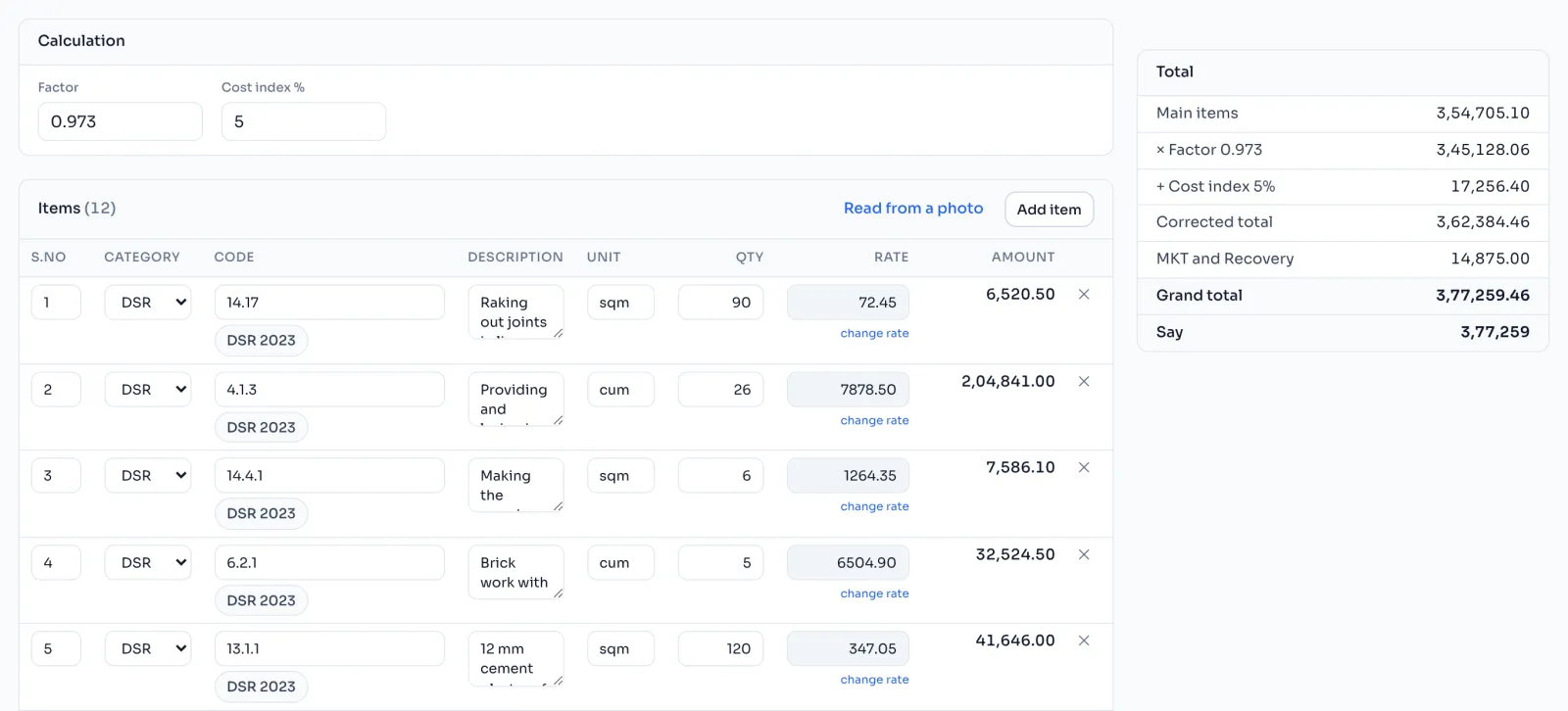
- Press Add item.
- Type the S.No exactly as your schedule prints it.
- Choose the Category, usually DSR.
- Type the Code, or a few words, and pick the item from the list. Its description, unit and rate come from the rate book. Find an item in the rate book
- Type the Qty from your schedule. The Amount works itself out.
To bring in a whole schedule at once, press Read from a photo and let Revenin AI read it. Read your papers
The categories
| Category | What it is | Factor and cost index |
|---|---|---|
| DSR | An item from the rate book | Yes |
| Appd. | An item at the department's approved rate | Yes |
| NS | A non schedule item | Yes |
| MKT | An item at the market rate | No, it stays at par |
| Recovery | Something taken off the bill | No, it stays at par |
Things to know
- S.No is never sorted or renumbered. Type it as the paper has it, even 16 17. The AE checks your bill against his copy by S.No.
- A rate that came from the book is locked. To use a different rate, press change rate. Every rate you changed is listed as rates changed from the book, so you can check them before you send the bill.
- If you type a new code on a row, the old item is cleared and the new one takes its place.
- MKT and Recovery items are typed by hand, and a Recovery amount is taken off.
- The Factor and Cost index % boxes at the top are copied to the Bill page the first time you open it.
How it is worked out
The totals on the right of the Schedule page follow the bill's chain:
Grand total = (Main items x Factor) plus Cost index %, plus MKT, less Recovery
Main items are the DSR, Appd. and NS items together. For a schedule with Main items of 10,00,000, a factor of 0.973, a cost index of 5%, MKT items of 20,000 and a Recovery of 5,000:
| Step | Working | Amount |
|---|---|---|
| Main items | DSR, Appd. and NS | 10,00,000.00 |
| Corrected total | 10,00,000 x 0.973 | 9,73,000.00 |
| Plus cost index | 9,73,000 x 5% = 48,650 | 10,21,650.00 |
| Plus MKT, at par | 10,41,650.00 | |
| Less Recovery, at par | 10,36,650.00 |
The quoted % is applied on the Bill page. Factor, cost index and quoted %
If you see this message
No items yet
The schedule is empty. Press Add item, or Read from a photo to read the paper.